Three ways to organise medallion architecture in Microsoft Fabric
Bronze, Silver and Gold can live in one lakehouse, three lakehouses, or three separate workspaces. Here is how the three layouts compare in Microsoft Fabric, and the one I would choose.
You have probably come across medallion architecture before. It organises data into three familiar layers: Bronze, Silver, and Gold.
Bronze, also called the raw layer, keeps data close to its original source. Silver, sometimes described as the clean layer, validates, cleans, and conforms that data. Gold, also called the curated layer, prepares business-ready tables and structures for Power BI semantic models, reports, and other analytical uses.
The purpose of each layer is relatively straightforward, but it can be the less obvious decision how to organise those layers in Microsoft Fabric.
There are at least three practical ways to implement a medallion architecture in Fabric. The same transformation logic can exist inside one lakehouse, across several lakehouses in one workspace, or across separate workspaces. Each layout affects permissions, ownership, day-to-day administration, and how easily the Fabric solution can accommodate new users, data sources, and security requirements later.
Scenario
To make the comparison more concrete, imagine that you have joined Nordfjord Retail, a fictional Nordic retailer with 43 stores across Norway and an online shop. Store sales and online sales currently come from separate source systems, and the company wants to bring them together in Microsoft Fabric for Power BI reporting.
You are responsible for designing the medallion architecture. You understand what Bronze, Silver, and Gold are supposed to do, but you are not yet sure how those layers should be arranged. You may even have assumed that Fabric has one standard medallion layout that every implementation should follow.
It does not. The layers describe how the data progresses, but they do not prescribe one workspace and lakehouse structure.
In this article, I compare three possible layouts and explain the one I would choose for Nordfjord Retail. The focus is specifically on workspace and lakehouse organisation. Gold could also be implemented using a Fabric Warehouse, but the choice between a lakehouse and a warehouse involves a different set of decisions and deserves an article of its own.
Approach 1: One workspace, one lakehouse
The simplest layout places all three layers inside one schema-enabled lakehouse. Schemas organise tables into named groups, which makes them easier to find and avoids keeping every table in one long, flat list. The schema name also becomes part of the table reference:
bronze.store_salessilver.salesgold.fact_sales
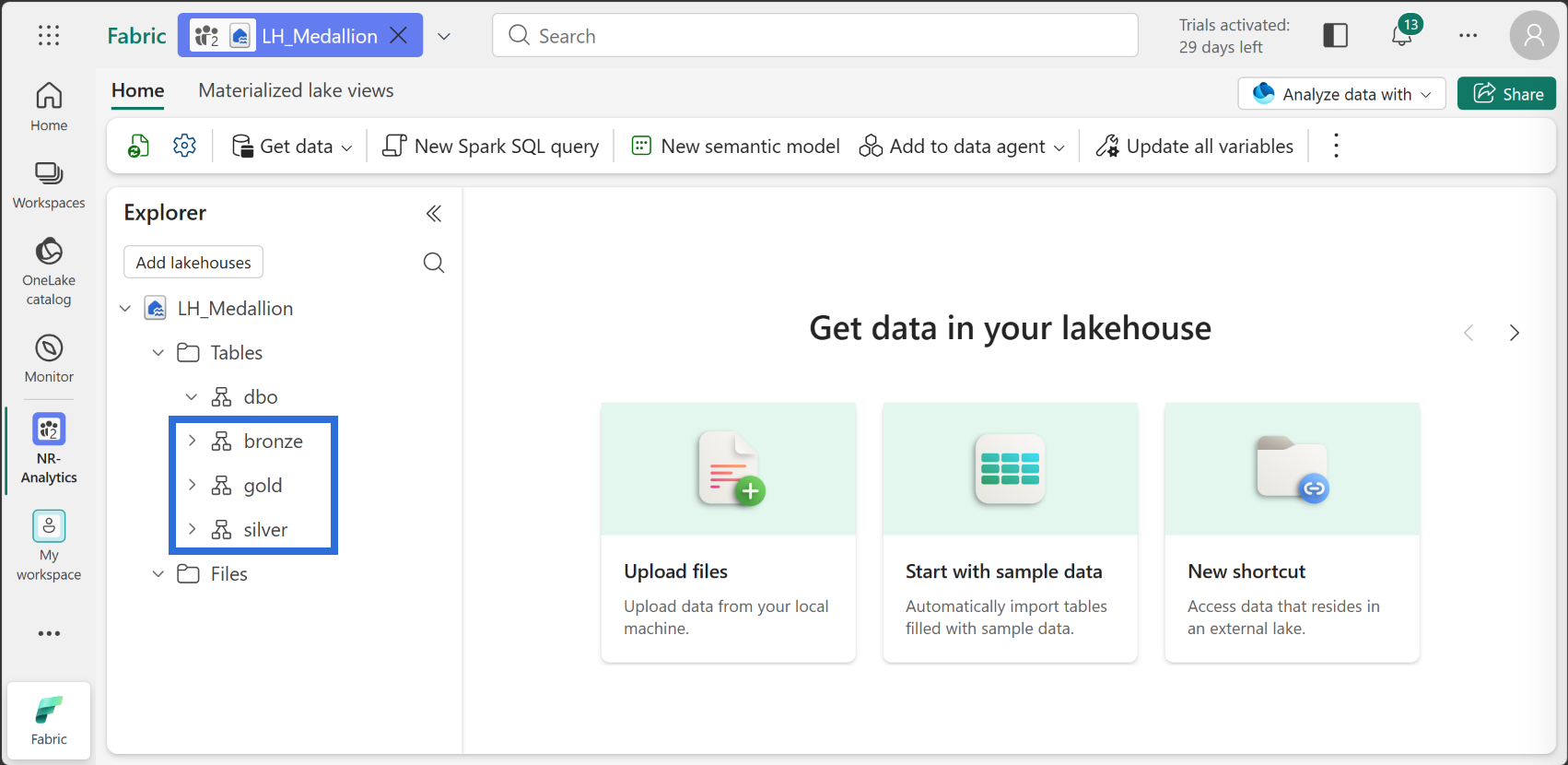
In this example, the schema tells us which medallion layer owns the table, while store_sales, sales, and fact_sales remain the individual table names.
This design is quick to set up and easy to navigate. There is one workspace, one lakehouse, and one set of workspace permissions to maintain. For personal learning, a short proof of concept, or a small solution managed by the same developers, that may be all that is needed.
The main downside appears when different people need different responsibilities. Bronze, Silver, and Gold are all stored inside the same Fabric item and workspace. A data engineer who receives a workspace role to load or modify Bronze data receives that role across the other items in the workspace as well.
The lakehouse may also become harder to navigate as the number of tables, notebooks, pipelines, and dependencies grows. Schemas keep the tables organised, but they do not give each layer its own Fabric item, owner, deployment boundary, or workspace membership.
Fabric can provide additional ways to control access. Item sharing can grant access without making someone a workspace member, while SQL permissions, OneLake security, and semantic model security can restrict access more precisely. Those controls must be designed separately, however, because the three schema names do not create separate security boundaries by themselves.
Microsoft's current medallion guidance recommends creating one lakehouse for each layer and, where stronger layer-level control is required, placing each lakehouse in its own workspace. For that reason, I would use Approach 1 mainly for learning, demonstrations, or temporary work rather than as my default starting point for an operational data platform.
Approach 2: One workspace, three lakehouses
A second option is to create a separate lakehouse for each medallion layer while keeping all three in the same workspace:
LH_BronzeLH_SilverLH_Gold
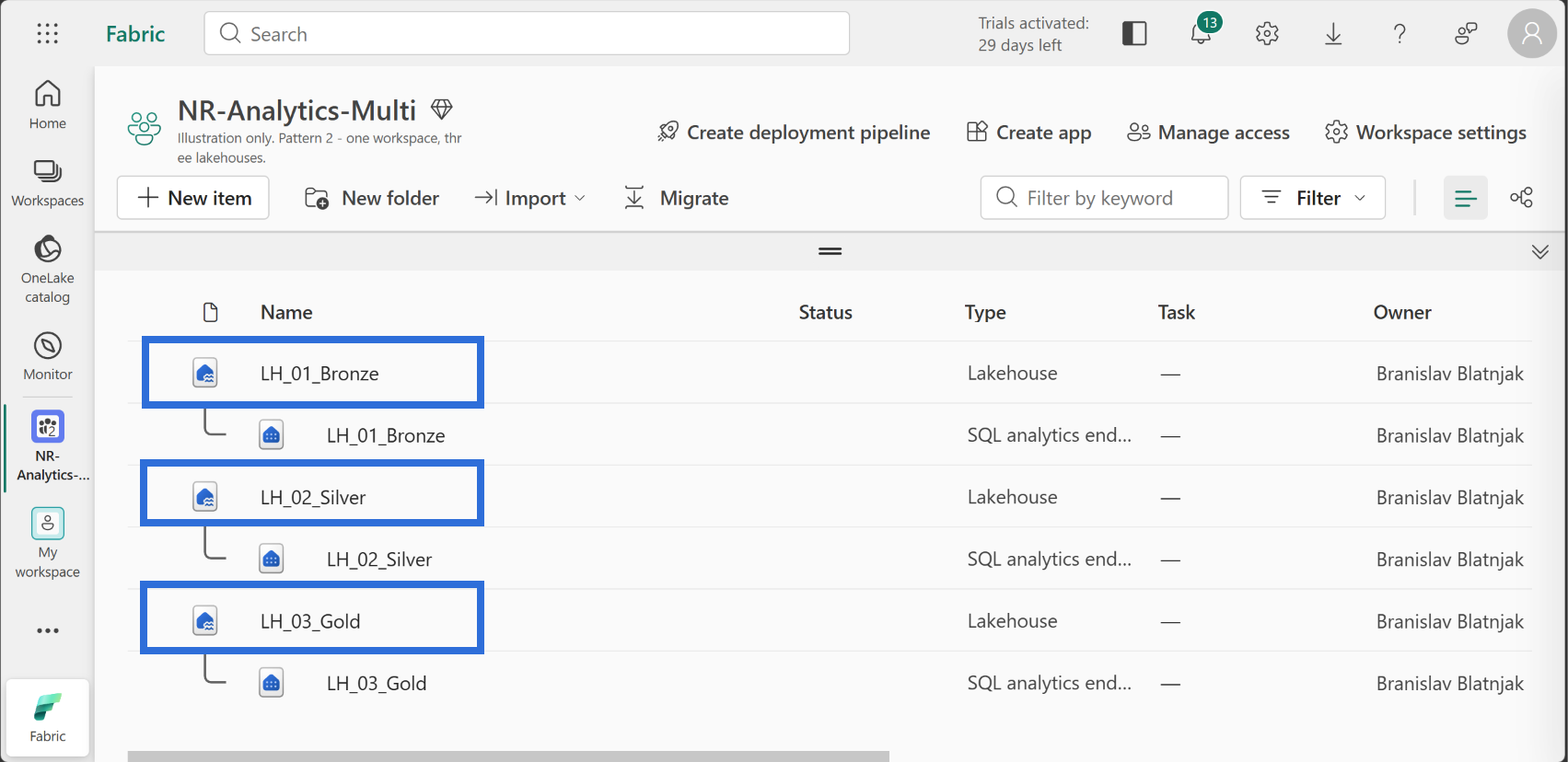
From a developer's point of view, this layout is easier to navigate than one large lakehouse. Bronze, Silver, and Gold appear as separate Fabric items, so each layer has its own table structure and can be opened and managed independently. Fabric also creates a separate SQL analytics endpoint for every lakehouse.
Notebooks, pipelines, dataflows, and semantic models can reference the lakehouse that belongs to the relevant layer. This keeps the responsibilities of Bronze, Silver, and Gold more visible and avoids placing every table inside one shared lakehouse.
The main limitation is access control. Although the lakehouses are separate items, they still sit inside the same workspace. Fabric workspace roles apply to all items in that workspace. Someone assigned the Contributor, Member, or Admin role therefore receives the capabilities of that role across LH_Bronze, LH_Silver, and LH_Gold.
In simple terms, the downside of this approach is that you cannot make someone a Contributor in Bronze while giving that same person only Viewer access in Gold through workspace roles. The role applies to the complete workspace, not to one selected lakehouse.
Item sharing can give someone access to an individual lakehouse without adding that person as a workspace member. This is useful for more limited access, but it does not change the role model for the developers and administrators who work as workspace members.
I recommend Approach 2 when one team owns the complete data flow from Bronze to Gold and the same workspace roles are acceptable for all three layers. It is a useful middle ground when separate lakehouses make the solution easier to understand and maintain, but separate workspace membership and administration are not required.
Approach 3: One workspace per layer
The third option gives each medallion layer its own workspace and lakehouse:
NR-BronzecontainingLH_BronzeNR-SilvercontainingLH_SilverNR-GoldcontainingLH_Gold
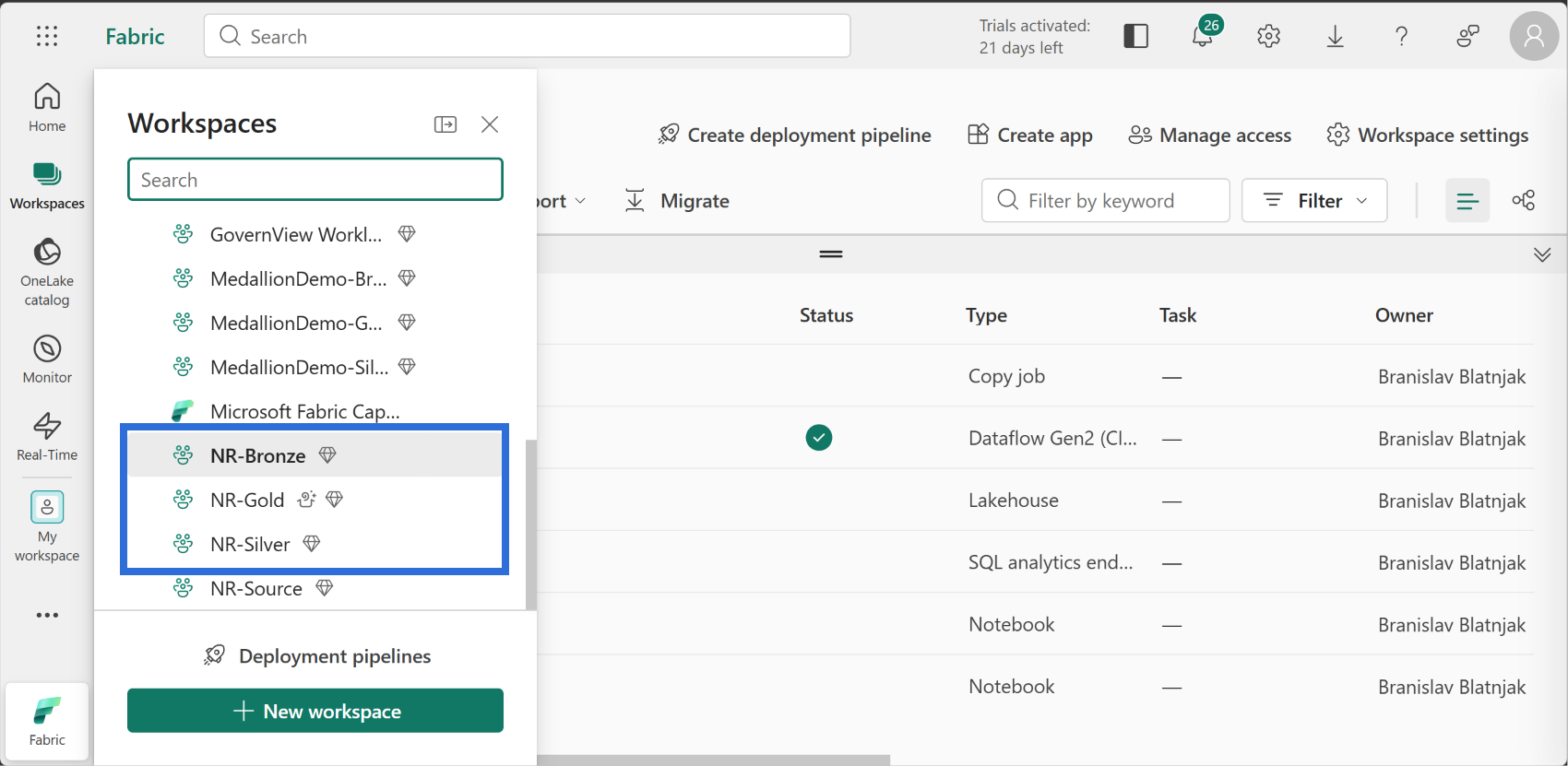
With this layout, each workspace has its own members and roles. Data engineers who load and manage raw source data can be Contributors in NR-Bronze without automatically receiving the same access in Silver or Gold. The people responsible for cleaning and conforming data can work in NR-Silver, while semantic model and report developers use the curated tables in NR-Gold.
Business users would normally access Power BI reports or apps rather than work directly with the Gold lakehouse. In practical terms, each group receives access to the part of the solution it needs, instead of everyone working across all three layers. Fabric workspace roles are limited to the workspace in which they are assigned, which makes this separation possible.
This separation reduces the risk of people receiving broader workspace access than their work requires. It also reduces the chance of someone accidentally changing an item outside the layer they are responsible for. The workspaces make the responsibility of each layer more visible: NR-Bronze owns ingestion and source-aligned data, NR-Silver owns cleaning and conformance, and NR-Gold owns the structures prepared for Power BI.
OneLake shortcuts allow the three workspaces to share data without copying the same tables from one lakehouse into another. For example, a shortcut in LH_Silver can point to a table stored in LH_Bronze. The table remains physically stored in Bronze, but Silver can read it through the shortcut. Gold can use the same approach to reference the conformed data in Silver.
Silver still owns the cleaned tables it creates, and Gold owns its reporting-ready output. The shortcut simply gives the downstream layer access to the upstream data it needs. It works more like a pointer than a second copy.
Separate workspaces do not solve every security requirement automatically. A shortcut does not bypass access control: the user or process reading through it must still have permission to access the target data. SQL analytics endpoints, OneLake data, semantic models, reports, and apps may also require their own security configuration.
What this layout provides is a clearer starting point. Workspace membership and administrative ownership can be managed separately for Bronze, Silver, and Gold, while more detailed security can be added where the data and reporting requirements demand it.
There is more administration, of course. The additional workspaces must be named, secured, monitored, documented, and included in the deployment process. That work exists even when one person initially manages the complete solution.
For me, this is also part of what makes architecture work interesting. The challenge is not only moving data from Bronze to Gold. It is deciding who should work with each layer, how the layers should connect, and how to keep the structure understandable when more people and requirements are added later.
Approach 3 requires more setup than the other two layouts, but it gives each medallion layer a clearer access and ownership boundary from the beginning.
Microsoft documentation referenced

Branislav Blatnjak
Power BI Consultant, Nordic Dynamics
I help companies turn existing business data into Power BI reports and semantic models, supporting the work from requirements through development, documentation, and handover.